One last look before it prints
Before I can order, I have to tick four boxes and type a word. Why, and what do I type?
Your book is printed exactly as it looks now, and it cannot be changed after you order. So before the order form opens, the window “One last look before it prints” asks you to look over your book one last time. Pictures painted with AI sometimes hide small mistakes, so the window lists four things to check in your whole book, the covers too: hands and fingers, faces, objects and other details, and the words, including names, dates, the title and the dedication.
The button “Everything looks right: continue” only works when all four boxes are ticked and the word PRINT is in the box. Capital or small letters are both fine. Nothing is ordered at this point: the delivery form comes next.
Steps
- Read the four points in the window. If you have checked them in your book, tick each box.
- Type the word PRINT in the box below the points. Type only that word, with nothing before or after it.
- Tap or click “Everything looks right: continue”. The delivery form opens, and nothing is ordered yet.
- Not sure about one point? Tap or click “Go back and check again” and fix that page first. Then tap or click “Order My Printed Copy!” again, tick the boxes and type the word once more.
Short video: The last check before printing
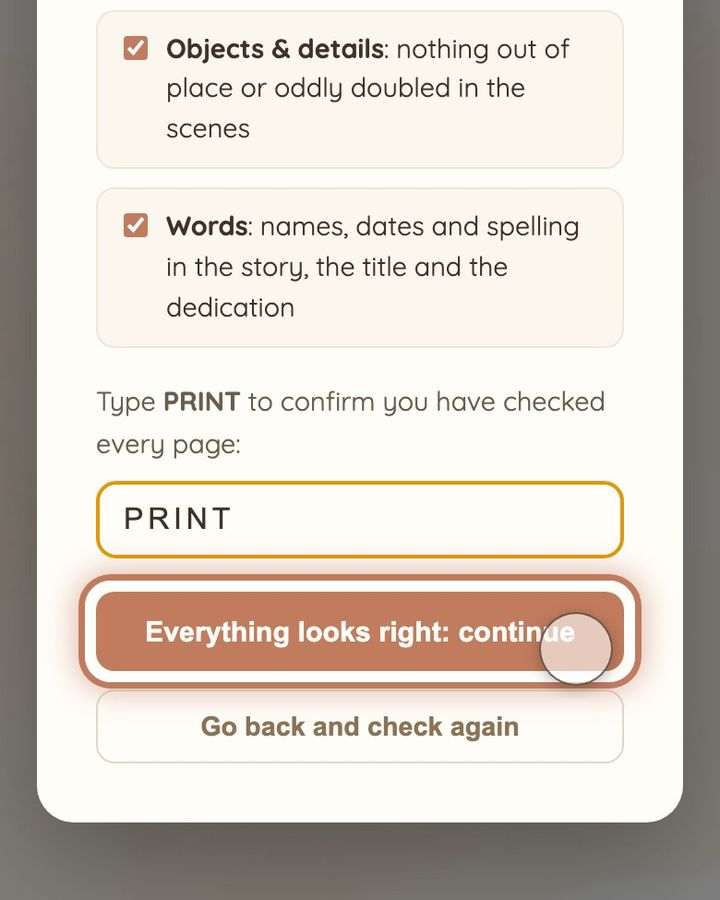
11 seconds · no sound
- Happy with every page? Tap or click “Order My Printed Copy!”.
- “One last look before it prints”: tick the four checks once you have looked.
- Type PRINT in the box.
- Tap or click “Everything looks right: continue”. Nothing is ordered yet.
If all four boxes are ticked, the word is in the box and “Everything looks right: continue” still does not work, check that the word is spelled right. Then reload the page and try once more. If it still does not work, write to us at hello@memolio.io.
Still stuck? Write to us at hello@memolio.io and tell us what you were trying to do.