The book title
How do I change the book title, or move it on the cover?
The title is printed as real text over the cover picture. It is never painted, so it is spelt exactly as you type it. Changing it is free, and you can change it as often as you like until you order.
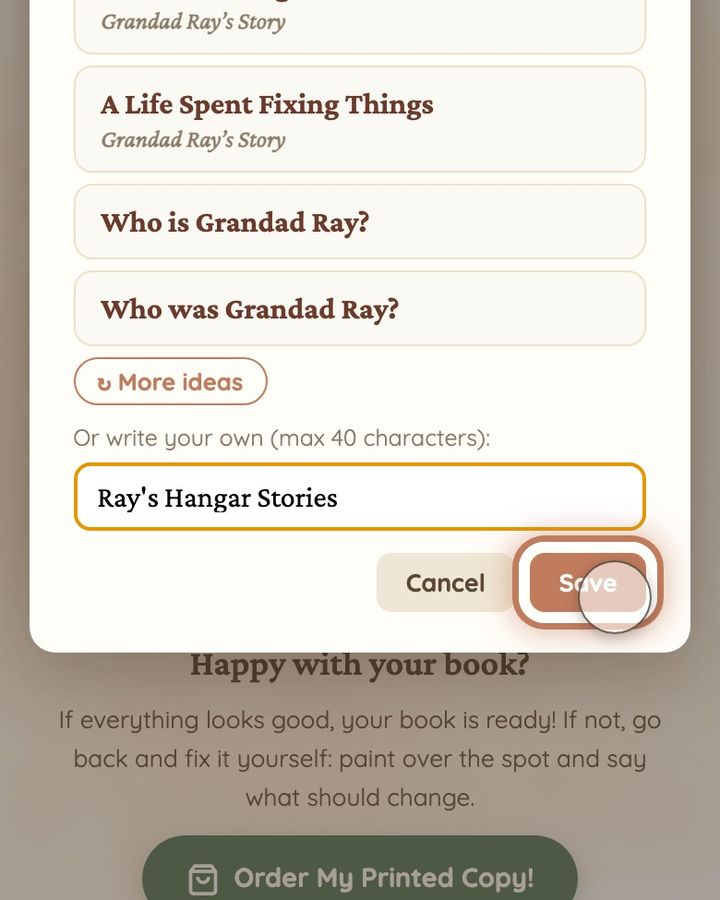
You can choose one of the ideas written from your story, or write your own title. On a book about a grandparent, the list always offers “Who is …?” and “Who was …?” with their name, so you can choose the past tense for someone who has died.
You can also move the title, make it bigger or smaller and change its colour. Every change is saved straight away, and the cover shows the title exactly where and how it will be printed. On a computer, “Drag to move · tap to style” appears when you point at the title. On a phone there is no hint: just tap or click the title. A long title in a big size can leave one word alone on a line. A smaller size or a shorter title solves that.
When you order, the order form shows the title once more under “Book title (printed on the cover)”, so you can check it a last time.
Steps
- Go to the front cover and tap or click the title once. A small bar with sizes and colours opens under it.
- Tap or click “Change title” in that bar.
- Tap or click one of the ideas to use it straight away, or tap or click “↻ More ideas”. To write your own, use the box under “Or write your own (max 40 characters):”. The box already shows your current title: delete it first, then type the new one. Then tap or click “Save”.
- Wait until “Title saved!” appears. The new title now shows on the cover.
- To move the title, press on it and drag it where you want it. To change its size or colour, tap or click it and choose a size or a colour in the bar. “Reset position” puts it back in its usual place.
Short video: Change the book title
9 seconds · no sound
- On the front cover, tap or click the title.
- Tap or click “Change title”.
- Tap or click an idea, or write your own (up to 40 characters).
- Tap or click “Save”.
Tap or click one of the ideas and it is saved straight away.
This doesn't use any of your image fixes.
If the title still does not save after you reload the page, or it covers a face and you cannot place it anywhere else, write to us at hello@memolio.io. Tell us what the title should say.
Still stuck? Write to us at hello@memolio.io and tell us what you were trying to do.